
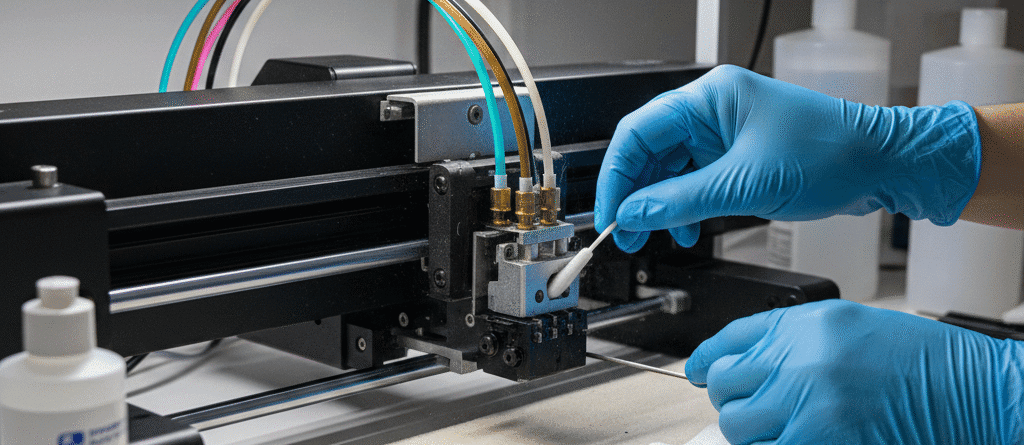
1. How to Avoid Print Clogs and Issues in T-Shirt Printing – Pro Guide
Print clogs and issues in T-shirt printing often first appear as missing lines, uneven colour or weak white coverage. A poor print is a symptom, however, and does not prove that the printhead is permanently blocked. Ink supply, the capping system, media handling and printer settings can produce similar symptoms.
Start with the nozzle-check procedure for your exact printer or conversion system. Keep a record of the result before changing settings or cleaning parts. That makes it easier to see whether an intervention helped and gives support staff useful evidence.
Chat with our team for printers, consumables, film, powder and business setup guidance.
What a nozzle check can tell you
A nozzle pattern checks whether the expected lines are being printed. Compare it with the example in the machine manual, including the method specified for viewing white ink. Missing sections can indicate a nozzle or ink-delivery problem, but the pattern alone cannot identify the cause.

Check the basics before starting a cleaning cycle
- Confirm that the installed ink is the correct formulation for the machine. Textile DTF ink, sublimation ink and UV ink are different systems.
- Check ink levels and accessible supply components using the manufacturer’s instructions. Do not bypass sensors or dismantle a pressurised system.
- Inspect the media path and the work area for dust, lint and film contact with the printhead.
- Check the recommended operating conditions and keep the printer away from direct heat and strong airflow.
- Follow the specified white-ink agitation or circulation procedure. Do not substitute a universal shaking time for the instructions on your ink and machine.
Choose maintenance materials by compatibility
A cleaning liquid should match the ink chemistry, printhead and intended procedure. The transparent DTF cleaner and DTF cleaner product listing are starting points for a compatibility enquiry, not permission to use either fluid in every printer. Confirm the exact application before ordering or using a cleaner.
A DTF capping solution has a specific maintenance purpose. It should not automatically replace a cleaner, flushing liquid or the machine’s prescribed storage procedure. Keep chemicals in their labelled containers and follow their safety and handling information.
Use the prescribed cleaning sequence
If the manual calls for a cleaning cycle, run the specified level and then recheck the nozzle pattern. Do not repeatedly run powerful or deep cleaning as a substitute for diagnosis. Ink consumption, waste-system capacity and the recommended waiting interval depend on the equipment.
Avoid forcing liquid through a head, scraping the nozzle surface or soaking parts unless an authorised procedure for that system specifically requires it. Stop and contact support if there are leaks, electrical faults, repeated head strikes or a persistent unresolved pattern.
Ink supply and white-ink settling
White ink contains pigment that can settle. Follow the supplier’s storage, mixing and circulation instructions and use the correct ink within its stated shelf life. A circulation upgrade does not eliminate daily checks or guarantee that clogging will never occur.
For converted A3/A4 systems, review the white-ink circulation system only after confirming the plumbing and electrical fit. Where a damper problem is diagnosed, the XP600/I3200 dampers and L1800/L800 damper serve different head families; choose the part that matches the actual assembly.
Build a practical maintenance record
Record the date, ink batch, nozzle pattern, cleaning level and result. Inspect the wiper and cap on the schedule in the machine instructions, and use the specified materials. Replace filters and other service parts based on their condition and service requirements rather than an invented monthly rule for every machine.
For a planned shutdown, ask for the correct storage procedure before the last production day. Leaving a printer idle, switching off maintenance functions or improvising a “wet cap” procedure can create additional problems.
Prevent repeat print problems
Once the nozzle pattern is acceptable, check film loading, artwork, RIP settings, powder coverage and curing separately. A good nozzle check does not guarantee a good transfer if the film or curing process is wrong. Use a sample print and a finished-transfer quality check before a large batch.
Choose compatible Inkbank white DTF ink for converted printers or the formulation specified for your industrial machine; do not mix different ink systems without written compatibility guidance. Keep suitable DTF PET film clean and protected until loading.
When to ask for support
Share the printer model, ink type, nozzle-check photographs, error messages and the steps already taken. Good records help distinguish a supply fault from a maintenance or hardware issue. There is no “non-clog” consumable or fixed percentage improvement that can replace correct setup and maintenance.
Further reading: manufacturer guidance on nozzle checks and head-cleaning tools. Use your own model’s instructions for the actual sequence and materials.

LEAVE A COMMENT