
Ink Not Feeding Properly in DTF Printer: Troubleshooting Steps
1. Introduction to Ink Feeding Problems in DTF Printers
You are printing a batch of t-shirts, and suddenly one color stops printing. Maybe the white ink disappears, or the design starts looking faded. You check the ink tank, and there is still ink inside. So, what went wrong?
This is a common situation in DTF printing shops.
Chat with our team for printers, consumables, film, powder and business setup guidance.
DTF printer ink flow problems can happen because of air bubbles, blocked ink tubes, damaged dampers, low ink levels, or poor maintenance. Sometimes the issue is small, such as a loose connection. Other times, it needs careful inspection.
The good news is that many ink feeding issues can be identified without replacing expensive printer parts.
This guide explains how to check the ink supply, find the problem, and restore normal printing without unnecessary cleaning cycles or wasted ink.
2. Why Is Ink Not Feeding Properly in My DTF Printer?
A DTF printer needs a steady ink supply from the ink tank to the printhead. When that supply is interrupted, printing quality drops.
The first step is to understand exactly what is happening.
| Ink feeding problem | What it usually means |
|---|---|
| No ink coming out | Empty supply, air lock, blocked line, or maintenance system problem |
| Weak ink flow | Partial blockage, low ink supply, or poor damper performance |
| Intermittent ink flow | Air leakage, unstable pressure, or loose connections |
| One colour missing | Problem in that color’s ink line, damper, or nozzle group |
| All colours missing | Shared supply issue, maintenance system fault, or printhead-related problem |
For example, if cyan is missing but other colours print normally, start by checking the cyan ink supply.
If every colour disappears together, inspect the common systems before replacing individual dampers.
Correct diagnosis saves time, especially during bulk printing orders.
3. Common Signs of Ink Feeding Problems in DTF Printing
Most DTF printer ink flow problems show warning signs before printing stops completely.
Watch for these symptoms:
- Blank areas appearing inside printed designs.
- One or more colours missing.
- Faded or uneven printing.
- Horizontal lines, also called banding.
- Broken lines in nozzle check patterns.
- White ink not printing or printing unevenly.
- Visible air bubbles inside ink tubes.
- Printing quality improving briefly after cleaning, then becoming poor again.
Imagine printing 100 black t-shirts for a local clothing brand. The first 20 transfers look good, but the next few have weak white underbase printing.
That may indicate an ink supply problem rather than a problem with the artwork.
Run a nozzle check before continuing production.
4. Main Causes of Ink Not Feeding Properly in DTF Printers
Several parts work together to deliver ink.
Common causes include:
Low ink levels: When ink becomes too low, the supply system may draw air instead of ink.
Blocked ink tubes: Dried pigment, bends, or contamination can restrict ink movement.
Damper problems: A damaged or clogged damper may not maintain a steady supply.
Loose connections: Small air leaks can interrupt ink flow even when ink is visible in the tubes.
Poor ink quality: Thick, expired, or incompatible ink may create deposits.
Printhead maintenance issues: A poorly sealing capping station or malfunctioning pump can prevent proper cleaning and priming.
White DTF ink requires particular attention because its heavy pigment can settle during idle periods.
A regular inspection of the ink supply is often more useful than repeatedly running head cleaning.
5. How Air Bubbles Stop Ink Flow in DTF Printers
Air bubbles are a major cause of DTF printer ink flow problems.
Ink should travel through the supply tubes in a continuous path. When air enters the line, it can interrupt the supply reaching the damper.
Small bubbles may pass through some systems. Large trapped air pockets can cause noticeable printing problems.
Air may enter because of:
- Low ink tank levels.
- Loose tube fittings.
- Cracked ink tubes.
- Poor cartridge seals.
- Incorrect priming.
- Leaks around the damper connection.
A common warning sign is a large air gap that remains in the same part of a transparent tube.
If the bubble returns after priming, look for a leak rather than repeatedly pulling ink through the line.
6. How to Check Ink Levels, Ink Tanks, and Cartridge Seals
Before touching the printhead, inspect the ink tanks.
Follow these checks:
- Check that every tank contains enough ink for normal operation.
- Confirm that each tank is installed in its correct position.
- Inspect caps and cartridge seals for damage.
- Check the needle seals where the printer uses cartridge connections.
- Make sure the tank vent is configured according to the printer manufacturer’s instructions.
- Look for ink leakage, cracks, or loose fittings.
A blocked vent can prevent air from replacing the ink leaving a tank, creating a vacuum that restricts flow.
However, not every ink system uses an open vent. Some sealed systems require specific pressure control.
Never drill a vent hole or leave a sealed cartridge open without manufacturer guidance.
7. How to Inspect Ink Tubes, Dampers, and Connections
The next step is to inspect the ink delivery path.
Start at the tank and follow each tube toward the damper.
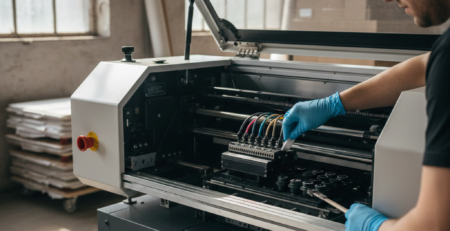
Check for sharp bends, pinched sections, cracks, cloudy deposits, and visible air gaps.
Pay attention to connections at the tank, damper, and printhead. A fitting may appear connected while still allowing air to enter.
Next, inspect the damper for damage, contamination, or unusual air pockets.
Aged dampers can lose their ability to regulate ink properly. A clogged filter inside a damper may also restrict flow.
For compatible replacement parts, check the 🔵 DTF Dampers at the DTFshop.in and 🔵 DTF Ink Tubes at DTFshop.in categories or product listings.
Confirm the correct printer model and fitting size before purchasing.
8. How to Remove Air From DTF Printer Ink Lines Step by Step
When visible air pockets are interrupting the supply, the ink line may need priming.
Use the printer’s approved priming procedure first.
- Pause printing and inspect the ink tank levels.
- Check the ink tubes and fittings for leaks.
- Open the printer’s maintenance software.
- Select the supported ink fill, ink loading, or priming function.
- Run the cycle as directed by the printer manufacturer.
- Allow the system to finish before inspecting the tubes.
- Run a nozzle check to confirm whether ink delivery has improved.
Some printer models permit manual priming with a compatible 🔵 syringe and service adapter.
If your model supports this, use only its documented service port and method. Do not attach a syringe directly to the printhead or apply uncontrolled suction or pressure. This can damage internal seals or the printhead.
Wear gloves, protect the work area from ink spills, and keep all electrical connections dry.
9. How to Prime Dampers and Restore Proper Ink Flow
A new damper may contain air before installation. It must be prepared according to the printer’s service procedure.
For printers with a supported damper-priming method, a trained operator can use the specified adapter and approved procedure to fill the damper without trapping air.
Important precautions include:
- Use a compatible damper for the exact printhead.
- Keep the ink supply clean.
- Avoid touching the damper’s sealing surfaces.
- Never force ink into the printhead.
- Replace damaged seals instead of trying to compensate with extra pressure.
After installation, use the printer’s recommended ink loading procedure and perform a nozzle check.
For example, printers using XP600 and i3200 printheads may have different damper fittings and priming requirements.
Always follow the procedure for the actual machine, not a generic online video.
10. How to Run Nozzle Checks and Ink Loading Cycles
A nozzle check is one of the easiest ways to investigate DTF printer ink flow problems.
It shows whether individual nozzle groups are printing correctly.
Start with a nozzle check before cleaning. If the pattern has missing lines, inspect the ink supply and run one normal cleaning cycle if appropriate.
Then perform another nozzle check.
If the pattern improves, allow the printer to stabilize before deciding whether further maintenance is needed.
If there is no improvement, stop repeating the same cleaning operation.
Powerful cleaning cycles consume significant ink and can put extra strain on the maintenance system.
Use ink loading only when the manufacturer’s procedure calls for it, such as after certain repairs or when restoring an empty supply line.
11. When to Clean the Printhead and When to Replace a Damper
A blocked nozzle and a blocked damper are not the same problem.
A nozzle issue may improve with a normal cleaning cycle or an approved maintenance procedure.
A damaged damper generally needs replacement.
Consider replacing the damper when:
- Its filter is badly clogged.
- The housing is cracked.
- Its seal is damaged.
- Air repeatedly enters through the damper.
- Ink flow remains unstable after supply problems are corrected.
Do not soak or flush a damper unless its manufacturer specifically allows it.
For printhead maintenance, use only a compatible 🔵 DTF printer cleaning solution and the printer’s approved cleaning method.
Avoid touching the nozzle surface with sharp objects, hard brushes, or unapproved chemicals.
12. How Ink Viscosity, Temperature, and Storage Affect Ink Feeding
Ink condition matters just as much as printer hardware.
DTF ink contains pigments that can settle over time. White ink is especially sensitive because its pigment is heavier.
If the printer stays idle over a Sunday holiday, Monday morning may bring uneven white printing.
Thickened ink, pigment separation, or expired ink can restrict the supply system.
Low temperatures can increase ink viscosity, while high humidity can contribute to condensation and moisture-related problems. Dust may contaminate open containers and exposed fittings.
Keep the printing room within the printer and ink manufacturers’ recommended conditions.
Store ink in properly closed containers, away from direct sunlight and temperature extremes.
Follow the supplier’s instructions for white ink agitation or circulation. Do not shake every ink tank without checking its design.
13. Common Ink Feeding Mistakes to Avoid in DTF Printing
Some DTF printer ink flow problems become worse because of incorrect troubleshooting.
Common mistakes include:
- Running powerful cleaning cycles repeatedly.
- Allowing ink tanks to run nearly empty.
- Mixing incompatible ink brands or formulations.
- Using a damaged damper.
- Ignoring small air leaks.
- Leaving white ink idle without its recommended circulation routine.
- Using unsuitable cleaning liquids.
- Applying excessive pressure during manual priming.
A small printing shop may try several cleaning cycles to recover one missing colour.
But if the actual problem is a cracked tube, those cycles will not repair it.
Find the cause before spending more ink.
14. How to Prevent Ink Feeding Problems in Future
A simple maintenance routine can prevent many interruptions.
Daily routine
- Check ink levels before production.
- Inspect transparent tubes for unusual air pockets.
- Confirm white ink circulation is operating as designed.
- Run a nozzle check before important jobs.
- Check for ink leaks around accessible fittings.
- Follow the printer’s shutdown procedure.
Weekly routine
- Inspect dampers and visible tubing.
- Clean accessible maintenance areas according to the manual.
- Check the capping station condition.
- Inspect tank seals and approved vent arrangements.
- Review ink expiry dates and storage conditions.
- Check whether the printer has recorded repeated cleaning errors.
For a small Indian DTF business, spending a few minutes on these checks can prevent wasted transfers during a large t-shirt order.
15. Best Products and Accessories for Smooth DTF Ink Flow
Good accessories make maintenance easier, but compatibility matters more than price.
A suitable 🔵 DTF Ink formulation helps maintain predictable printing performance.
Replacement 🔵 Dampers are useful when filters or seals fail. Properly sized 🔵 Ink Tubes help prevent restrictions and leaks.
A compatible 🔵 Ink Supply System is particularly important for small shops using continuous ink delivery.
A working 🔵 Capping Station also supports proper nozzle maintenance.
Printers such as the 🔵 ProlificGeeks DTF Printer L1800, and models using 🔵 XP600 or 🔵 i3200 printheads, require parts matched to their actual ink system.
You can explore relevant accessories at DTFshop.in. Verify specifications and availability before ordering.
16. Step-by-Step Troubleshooting Checklist for Ink Not Feeding Properly
Use this checklist when printing becomes weak or stops unexpectedly.
Ink Flow Troubleshooting Checklist
0 of 10 completedRun a nozzle check and identify which colours are affected.Check all ink tank levels.Inspect cartridge seals, caps, and approved vents.Look for bends, cracks, deposits, or air gaps in tubes.Inspect accessible tube connections for leaks.Check dampers for visible damage or clogging.Use the manufacturer-approved ink priming function if required.Run another nozzle check after corrective action.Perform one normal head cleaning if appropriate.Stop and seek qualified service if the problem remains.
Reset checklist
The most important habit is to test after each corrective step.
Changing several things at once makes it difficult to identify the actual fault.
17. Conclusion: Fix Ink Feeding Problems and Keep Your DTF Printer Running
Most DTF printer ink flow problems start with something that can be checked: low ink, trapped air, damaged seals, restricted tubing, or poor maintenance.
Start with the simple checks. Inspect the ink supply, look for air bubbles, examine the dampers, and run nozzle tests after corrective actions.
Avoid forcing ink through the system or repeating powerful cleaning cycles without understanding the cause.
For Indian DTF printing businesses, regular maintenance is especially useful during bulk t-shirt production, busy festival orders, and startup after holidays.
A stable ink supply means fewer rejected prints, less wasted ink, and more dependable production.
8. Product Suggestions
These DTFshop.in products are relevant to ink feeding, white ink circulation, and routine printer maintenance. Links below lead to product pages or relevant product categories.

🔵 DTF Dampers – L1800, L800, XP600
Used when a compatible damper is damaged, leaking, or clogged. Check the exact printhead fitting before replacement.

Useful for replacing pinched, cracked, or blocked ink supply tubing. Match the internal diameter and connector type.

🔵 White Ink Circulation System for A3 Printers
Helps maintain pigment movement in compatible white ink systems and reduces the risk of settling during idle periods.

🔵 DTF Printer Cleaning Solution
For approved cleaning and maintenance tasks. Confirm compatibility with the ink and printhead.

🔵 DTF Unclogging and Maintenance Kit
An option for approved maintenance procedures. Confirm the included accessories and follow the printer’s service instructions.
Product listings were checked against DTFshop.in. Availability, kit contents, and compatibility may change.
Dtfshop
+3
9. External References + Credits
These sources provide additional technical background for DTF printing, ink behavior, and printhead maintenance.
1. FESPA – DTF: A New Way to Personalisation Textile Printing Explains the DTF printing process, including CMYK inks, white ink underbases, transfer films, and production methods.
FESPA
2. ResearchGate – Inkjet and Inkjet-Based 3D Printing Discusses how ink properties, pigment stability, particle settling, and viscosity affect inkjet printing performance.
ResearchGate
3. ResearchGate – Optimization of Experimental Parameters to Suppress Nozzle Clogging Provides technical research on printhead nozzle clogging and inkjet operating conditions.
Request PDF
The references support the general technical explanations. Model-specific maintenance procedures should always be checked against the printer manufacturer’s documentation.

LEAVE A COMMENT