
Epson L1800 DTF Conversion Kit: Is It Worth It for Indian Printers
1. Introduction: Why Indian Printers Are Considering the Epson L1800 DTF Conversion Kit
DTF printing is becoming a practical business option for Indian t-shirt printers, custom gift shops, and small apparel businesses. Customers want personalized t-shirts, college event merchandise, company uniforms, and small quantities of printed clothing.
But buying a new DTF printer can require a significant investment.
Chat with our team for printers, consumables, film, powder and business setup guidance.
This is why many beginners consider the Epson L1800 DTF Conversion Kit. It offers a way to turn a compatible photo printer into a basic DTF printing machine without immediately investing in a professional production setup.
However, conversion also brings maintenance, printhead, and reliability challenges.
So, is it actually worth the money? Let’s look at the costs, benefits, and practical problems before deciding.
2. What Is an Epson L1800 DTF Conversion Kit?
An Epson L1800 DTF Conversion Kit is a collection of parts used to modify an Epson L1800 photo printer for direct-to-film printing.
A normal Epson L1800 uses six-colour photo ink to print on paper. A converted machine uses compatible DTF ink to print designs onto special transfer film.
The design is then transferred to fabric using adhesive powder and heat.
The conversion generally involves changes to the ink delivery system, printer configuration, film handling, and maintenance components.
It is important to remember that the L1800 was not originally designed as a DTF printer. Conversion is a modification, not an official factory feature.
3. How the Epson L1800 DTF Conversion Kit Works
The DTF printing process is straightforward once the machine has been correctly converted.
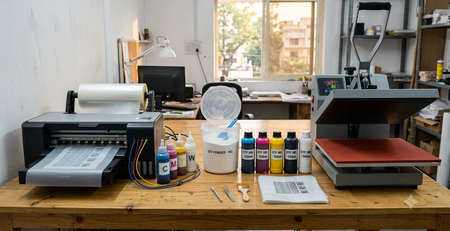
First, the artwork is prepared using compatible RIP software. The software controls the color printing and white ink layer.
The converted printer applies CMYK and white DTF ink onto the coated side of the transfer film.
Next, suitable hot melt adhesive powder is applied to the wet ink. The powder is cured using controlled heat, according to the material supplier’s instructions.
Finally, a heat press transfers the printed design onto a t-shirt or another compatible fabric.
The key difference from normal photo printing is the use of DTF inks, a white ink layer, special film, and an adhesive transfer process.
4. What Is Included in a Typical Epson L1800 DTF Conversion Kit?
The contents vary between suppliers. A typical Epson L1800 DTF Conversion Kit may contain or require:
- DTF-compatible ink delivery components.
- Dampers and ink tubes.
- Modified or compatible ink supply arrangements.
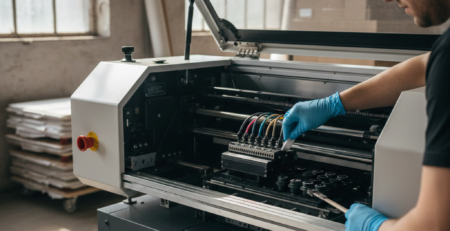
- Capping station or maintenance components.
- PET film feeding support.
- White ink management components.
- Compatible RIP software and printer profiles.
Some sellers provide only the conversion hardware. Others offer a more complete package.
Always confirm whether the kit includes white ink support, RIP software, installation assistance, and replacement parts.
Do not assume that a conversion kit includes the printer itself.
5. Why the Epson L1800 Is Popular for DTF Conversion in India
The Epson L1800 is an A3+ photo printer. Its supported media width is useful for many garment designs, including front chest graphics and larger t-shirt artwork.
For small Indian printing shops, A3+ output can be a practical starting point.
Another reason for its popularity is familiarity. Many printer technicians already understand Epson inkjet hardware, making basic servicing and troubleshooting more approachable.
A small shop printing custom birthday t-shirts, for example, may not need a large industrial printer.
However, A3+ paper capability does not automatically mean every converted machine can handle full-width DTF film reliably. Actual printable width depends on the conversion and film feed arrangement.
6. Is the Epson L1800 DTF Conversion Kit Worth It for Indian Printers?
The Epson L1800 DTF Conversion Kit can be worthwhile when the business has limited order volume, access to technical support, and enough time for regular maintenance.
It is especially interesting for people who already own a working L1800.
But buying an old printer only because the conversion kit looks cheap is not always a good decision.
A used machine may have a worn printhead, unreliable ink delivery, or damaged maintenance parts. Repairing these problems can quickly reduce the expected savings.
Before buying, compare the total setup cost with the price of a ready-made DTF printer.
7. Advantages of Using an Epson L1800 DTF Conversion Kit
The main advantage is the possibility of reducing initial equipment spending.
Other practical benefits include:
- Suitable print size for many t-shirt designs.
- Useful for personalized and small-batch orders.
- Compact compared with larger production equipment.
- Familiar inkjet components.
- Opportunity to learn DTF printing before investing in larger equipment.
For a home-based custom gift business receiving occasional orders, these advantages can be useful.
Still, the savings depend heavily on the condition of the printer and the quality of the conversion.
8. Limitations and Risks of Converting an Epson L1800 to DTF
An L1800 conversion has several limitations.
The biggest concern is white ink. White pigment settles over time and can clog the printhead and ink delivery system.
Converted machines may also experience film feeding problems, inconsistent printing, and higher maintenance requirements.
The printhead is another important risk. Replacing a damaged printhead can be expensive.
Conversion may also affect or void the manufacturer’s warranty, and official support may not cover DTF-related problems.
Anyone planning to convert an Epson L1800 to DTF should be comfortable with regular troubleshooting or have access to a knowledgeable technician.
9. Epson L1800 DTF Conversion Kit vs Buying a Ready-Made DTF Printer
| Feature | Converted Epson L1800 | Ready-Made DTF Printer |
|---|---|---|
| Initial investment | Potentially lower | Usually higher |
| Print width | A3+ class, depending on modification | Depends on model |
| White ink circulation | Usually no automatic system | Available on some models |
| Maintenance | More manual attention | Depends on the machine. |
| Production speed | Generally limited | Can be significantly faster |
| Best use | Learning and small orders | Regular commercial production |
A ready-made printer is not automatically maintenance-free. However, machines designed specifically for DTF printing may provide better film handling and white ink management.
10. Real Cost of Setting Up an Epson L1800 DTF Printer in India
The total DTF printing setup cost in India includes much more than the conversion kit.
Illustrative planning estimates in Indian rupees, not verified supplier quotations. Actual prices depend on printer condition, kit contents, location, taxes, and support.
| Item | Estimated Cost |
|---|---|
| Epson L1800 printer, if purchasing separately | ₹25,000–₹50,000 |
| Conversion kit and related parts | ₹8,000–₹20,000 |
| DTF ink set | ₹2,000–₹6,000 |
| PET film starter stock | ₹1,000–₹3,000 |
| Hot melt powder | ₹500–₹2,000 |
| Cleaning supplies | ₹500–₹2,000 |
| Heat press | ₹10,000–₹25,000 |
| RIP software, if not included | ₹0–₹15,000+ |
Illustrative total investment
₹47,000–₹1,23,000+
Based on the example ranges above. Excludes some installation, ventilation, electricity, rejects, and repair costs.
The final amount can be much higher than the advertised conversion kit price.
A business should also keep money aside for failed prints, maintenance, and replacement components.
11. White Ink Challenges in Epson L1800 DTF Printing
White ink is one of the most demanding parts of DTF printing.
Unlike ordinary CMYK ink, white DTF ink contains heavier pigment that tends to settle.
If the printer remains unused, the ink can separate and create blockages.
A standard L1800 does not have a factory-installed automatic white ink circulation system for DTF printing.
Some modified systems add white ink agitation or circulation, but their effectiveness varies.
For reliable printing, follow the ink supplier’s agitation recommendations, perform regular nozzle checks, and avoid unnecessary long idle periods.
Never assume that repeatedly running powerful cleaning cycles will solve every white ink problem.
12. Print Quality and Speed: What Indian Printers Can Expect
A properly converted L1800 can produce attractive designs with fine details and colorful artwork.
However, the final result depends on the printhead condition, RIP settings, ink quality, film coating, curing, and heat pressing.
Speed is more limited.
A converted L1800 is generally better suited to small orders than continuous high-volume production.
For example, printing five customized t-shirts for a birthday event may be manageable. Producing hundreds of transfers against a strict festive-season deadline can be difficult.
Professional DTF printers with production-focused printheads, such as i3200-based systems, are generally better suited to sustained output.
13. Who Should Buy an Epson L1800 DTF Conversion Kit?
The Epson L1800 DTF Conversion Kit is most suitable for people starting with modest production needs.
A small t-shirt shop can use it for customized names, logos, and occasional orders.
A home-based gift business may use it to create personalized clothing alongside other gift products.
A college student exploring a printing business might consider it as a supervised learning project, provided the full equipment cost, ventilation, and maintenance requirements are understood.
It can also work for an existing print shop that wants to test demand before purchasing a larger machine.
14. Who Should Avoid the Epson L1800 DTF Conversion Kit?
This conversion is not ideal for every business.
Avoid depending on it as your only production machine if you regularly handle bulk garment orders.
A shop producing hundreds of transfers during Diwali or a college festival needs predictable speed and reliability.
It is also a poor fit for anyone who cannot perform daily maintenance or arrange technical support.
If customers expect same-day bulk delivery, a dedicated production machine or outsourced DTF transfers may be a safer option.
15. How to Set Up an Epson L1800 DTF Conversion Kit Correctly
A successful conversion starts with checking the condition of the printer.
Before installation, a technician should inspect the printhead, ink system, feed mechanism, and maintenance assembly.
Use components confirmed as compatible with the L1800.
The conversion should be installed and tested by someone familiar with inkjet printer servicing. Incorrect modifications can damage the machine.
After installation, configure the RIP software and verify the ink channels, film feed, and printing profiles.
Test small designs before accepting customer orders.
Set up the printing area with suitable ventilation, temperature control, and safe handling of ink, adhesive powder, and curing equipment. Follow the manufacturers’ safety instructions.
16. Daily and Weekly Maintenance for an Epson L1800 DTF Printer
Consistent DTF printer maintenance is more useful than waiting until the printer stops working.
Daily maintenance checklistCheck nozzle pattern before productionCheck white ink condition and follow supplier agitation guidanceInspect film feed and visible ink deliveryKeep the printing area clean and at suitable temperatureFollow the recommended printer shutdown procedure
Weekly maintenance checklistInspect capping station and wiper conditionCheck dampers and ink tubes for leaks or airClean accessible maintenance areas using approved methodsReview print quality and colour consistencyCheck film, powder and ink storage conditions
Do not use unsuitable cleaning chemicals or force cleaning fluid through the printhead. Follow the supplier’s maintenance instructions.
17. Common Problems After Epson L1800 DTF Conversion and How to Fix Them
| Problem | Possible Cause | Practical Response |
|---|---|---|
| Nozzle clogging | Settled ink or dried residue | Run a nozzle check and follow approved cleaning procedures |
| Missing colours | Air, ink delivery or nozzle issues | Check ink levels and have the ink path inspected |
| Banding | Nozzle or feed inconsistency | Check nozzles, film feed and RIP settings |
| Ink not feeding | Blocked damper or tube | Inspect components with a technician |
| Film feeding issues | Poor alignment or feed modification | Check film loading and feed mechanism |
| Powder sticking incorrectly | Moisture or unsuitable curing | Review film, powder and curing specifications |
| Poor wash durability | Incorrect curing or pressing | Test the supplier’s recommended transfer settings |
Avoid replacing the printhead before ruling out simpler problems.
18. Best Products and Accessories for a Smooth Epson L1800 DTF Setup
A good DTF setup needs compatible consumables and reliable maintenance parts.
For an L1800-based setup, consider the following products from the DTFshop.in catalogue, subject to confirming their current availability and compatibility.
- 🔵 DTF Ink — for consistent colour and white ink printing.
- 🔵 Dampers — useful replacement components when ink delivery becomes unreliable.
- 🔵 Ink Tubes — important for a clean and compatible ink supply path.
- 🔵 DTF Printer Cleaning Solution — for approved maintenance procedures.
- 🔵 PET Film — choose film suitable for the printer’s feed arrangement.
- 🔵 Hot Melt Powder — select the correct adhesive for the intended fabric.
- 🔵 Heat Press — needed for controlled garment transfers.
The cheapest consumables do not always produce the lowest running cost. Failed transfers, blocked nozzles, and damaged garments also cost money.
19. Product Suggestions
Here are relevant products for internal linking. The links below lead to DTFshop.in product pages or relevant catalogue information.

Suitable for A3-class DTF transfers when the film feed and printer configuration are compatible.Internal link: Film and transfer consumables

A replacement component for ink flow problems when the existing damper is damaged, blocked, or leaking.Internal link: Printer spare parts

Use DTF-compatible ink and confirm the correct formulation for the converted printer.Internal link: DTF ink selection

Select powder according to fabric type, curing requirements, and transfer conditions.Internal link: DTF powder and consumables

🔵 DTF Printer Cleaning Solution
Useful for maintenance when approved by the printer and ink system supplier.Internal link: Printer cleaning and maintenance
Additional products to consider include 🔵 Ink Tubes, 🔵 Capping Station, 🔵 Ink Supply System, and 🔵 Heat Press. Confirm availability and exact model compatibility before adding individual product links.
For businesses considering a newer A3 machine, DTFshop.in also lists an A3 DTF L18050 printer setup. This is a different model from the L1800 and should not be treated as an identical replacement.
ProlificGeeks – Dtfshop
+1
20. External References + Credits
These resources can help readers understand the printing process and the importance of proper materials.
1. FESPA – DTF: A New Way to Personalisation Textile Printing Explains PET film, white ink, adhesive powder, curing, and textile transfer fundamentals.
FESPA
2. ResearchGate – Direct-to-Garment QR Code Printing Research Includes research comparing textile printing methods, with observations about DTF transfer durability and colour fastness under tested conditions.
ResearchGate
3. DTFshop.in – Epson L1800 for DTF Printing Provides additional context on L1800 conversion requirements, white ink management, and consumables

LEAVE A COMMENT